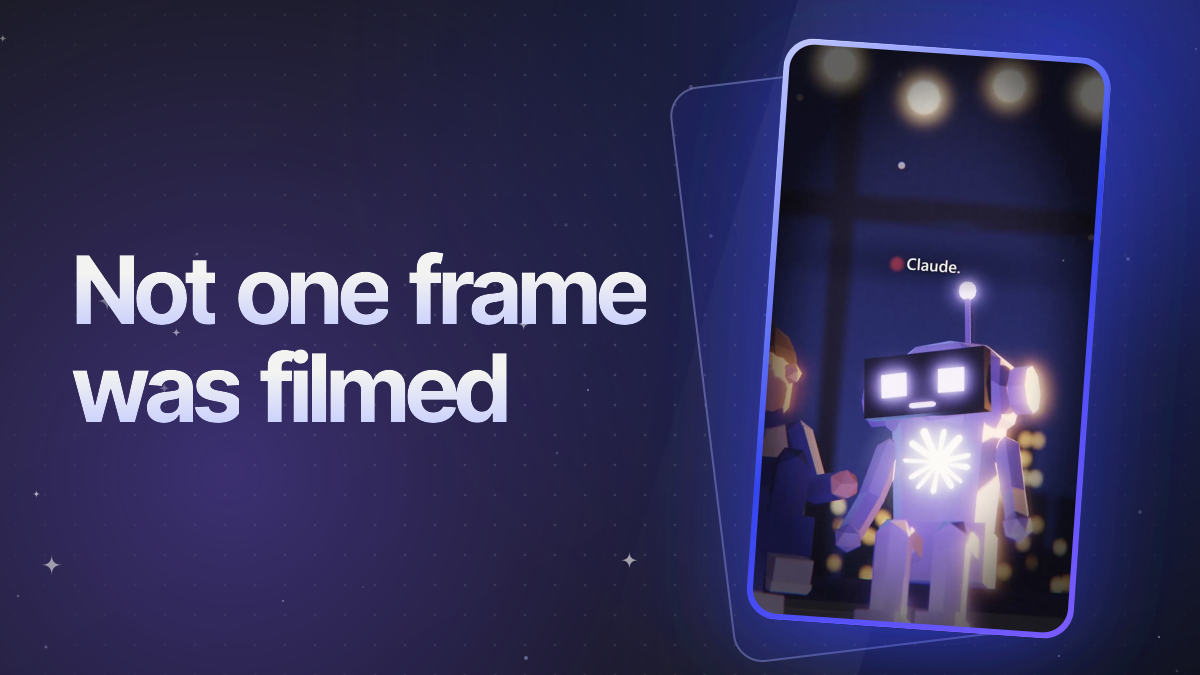
I build Morphy, and almost all of Morphy's content is made with AI: the short videos on Instagram (@agentmorphy), one of which passed 686,000 views in its first days, the feature clips on our features page, and a music video. This guide is what I've learned doing that, plus the current state of every major tool, checked against the vendors' own pages on October 10, 2026. AI tools change monthly; where something moved this year, I say so.
Two ways to make video with AI
Most guides only cover the first one. I use both.
| Generate it | Build it with code | |
|---|---|---|
| How | Describe a shot (or give an image), a video model makes the clip | An AI agent writes a scene in code (three.js, Remotion, HTML) and renders it frame by frame |
| Good at | Realistic footage, camera moves, things you can't film | Exact text, real app screens, the same character every time, edits to one detail |
| Length | 2 to 30 seconds per clip | As long as you like |
| Cost | Roughly $0.05 to $0.60 a second through the APIs, more for 4K | Your AI plan plus your own computer's time |
| Weak at | Text, hands, the same face across clips, small fixes | Photorealism; it takes setting up the first time |
My Instagram videos are built: a low-poly 3D night scene, a founder on his laptop and the Claude mascot beside him, written, voiced and rendered by agents. Generated clips are faster for a one-off shot, but a recurring character in a series is where code wins.
Scripts and hooks
Any of the big chat models writes a usable script; what makes a short video work is the structure. What I learned from the scripts behind @agentmorphy, including the one that passed 686,000 views:
- Name the AI in the first line ("Claude." / "Hey Claude…"), and signal who it's for in the very next words ("my app", "deploy", "users").
- Open on a confession or a tension, not a topic. "Claude, how does my app work?" / "You built it." / "Did I?"
- Short lines. An average of eight words or fewer, about 60 to 120 spoken words for 25 to 45 seconds.
- One insider truth, one meme, one sincere beat. The line people quote is the one they've lived.
- End on the punchline and cut. No sign-off, no end card.
Writing the script is also where an AI can do the boring part well: give it a long list of your own experiences and have it turn each into a script, one video per idea, keeping your wording.
Images and thumbnails
| Model | Best for | Price from | Watch out for |
|---|---|---|---|
| ChatGPT Images 2.5 (OpenAI) | Top of the public leaderboards for quality, text in images and editing (October 2026), at its highest quality setting | In ChatGPT, including Free with limits; API from about half a cent to about 21 cents a square image | Text placement and small text can still slip; complex prompts take up to 2 minutes |
| Nano Banana 2.1 (Google Gemini) | Near-top quality for about 3 cents an image; keeps up to 4 characters consistent | API about $0.034 per 1K image; on paid Gemini plans | Free Gemini users get the older Nano Banana 2 |
| Midjourney V8.2 | Its look; style references and moodboards | $10 a month | No API; images are public unless you're on Pro or Mega |
| FLUX 3 Image (Black Forest Labs) | Layout control and up to 10 references, by API or in its browser Playground | About 4 to 10 cents an image up to 2K (61 cents at 4K) | The API terms let BFL train on your inputs and outputs |
| Ideogram 4.5 | Titles and short text, with text you can turn into editable layers | 30 free credits a week (with a Google, Apple or Microsoft sign-in); Plus $20 a month | Free images are public |
| Recraft V4.1 | Vector graphics and brand styles | $12 a month | The free plan bans commercial use, Recraft owns free images, and they're public |
For thumbnails with words on them, start with ChatGPT Images 2.5 or Nano Banana 2.1. Ideogram and Midjourney say short text works best, and the others warn about small print or placement, so proofread every word and add longer text yourself in a design tool. Also worth a look: xAI's Grok Imagine and Microsoft's MAI-Image, both near the top of the leaderboards.
Generated video
| Model | Clip length | Sound | Price from | Watch out for |
|---|---|---|---|---|
| Gemini Omni (Google) | 4 to 10 s, extend to 40 s | Yes: dialogue, effects, music | Google AI Plus from $4.99 a month (US); API about $0.10 a second; 50 free credits a day in Google Flow; free in YouTube Shorts remixes | 720p, with 1080p and 4K upscaled; English is the only fully supported language; free Flow credits don't make video at peak hours |
| Veo 3.1 (Google) | 4 to 8 s, extend to 148 s (at 720p) | Yes | API from $0.05 a second (Lite) to $0.40 (Standard), $0.60 at 4K; in Flow | No free API tier |
| Kling 3.0 | 3 to 15 s | Yes, with lip-sync in 5 languages | Free daily credits; paid from about $7 a month; API from about $0.08 a second | Free videos carry a watermark and aren't for commercial use; Kling 4.0 is due in October, with 4.0 Flash already in early access |
| Seedance 2.5 (ByteDance) | 4 to 30 s | Yes, in 11 languages | In ByteDance's Dreamina app or BytePlus API; also in Runway, Luma and Pika | Won't take real human faces as references; terms are those of the app you use it in |
| Wan 3.0 (Alibaba) | Up to 30 s | Yes | API from $0.05 a second (480p) to $0.20 (1080p) | Unlike earlier Wan models, no open weights |
| MiniMax H3 ("Hailuo 3") | 4 to 15 s | Yes, in 11 languages | API from $0.08 a second; plans on hailuoai.video | Commercial use and no watermark on paid plans |
| Runway Gen-4.5 | 2 to 10 s | No (Runway's other models add sound) | $15 a month (about 52 s of Gen-4.5) | Not on the free plan; 720p; Runway may train on your inputs and outputs |
| Luma Ray3.2 | 5 or 10 s | No | $30 a month | Commercial use only for what you make during a paid subscription |
| Midjourney video | 5 s, extend to 21 s | No | $10 a month | From an image only; 480p on the $10 plan, 720p from $30 |
| Grok Imagine Video 1.5 (xAI) | 1 to 15 s | Yes, with lip-sync | SuperGrok $30 a month; API from $0.02 a second (Lite) | Every video carries a Grok watermark that can't be removed |
| FLUX 3 Video (Black Forest Labs) | Up to 20 s | Yes | API from $0.06 a second (draft) to $0.80 (4K) | Pay as you go only; the API terms let BFL use your inputs and outputs |
The independent leaderboards don't agree on a winner: Artificial Analysis puts Wan 3.0, Seedance 2.5 and MiniMax H3 at the top for video with sound, while LMArena has Gemini Omni first for text-to-video and MiniMax H3 first for image-to-video. If you'd rather run a model yourself, Lightricks' LTX-2.5 has open weights, free for companies under $10 million in revenue. If you need video that's safe to use commercially by how it was trained, Adobe's Firefly Video model is trained only on licensed and public-domain content.
Sora is gone. OpenAI closed the Sora app on April 26, 2026 and its API on September 24, with no replacement. It's a good reminder not to build your whole workflow on one generator. (ChatGPT has no built-in video generation either.)
Kling is unusually honest about what video models still get wrong: fingers warp, text gets misspelled, logos shift, characters drift between shots and physics goes odd. Its advice works for every model: add text, logos and captions afterwards, in an editor.
Talking heads and editing
- HeyGen: your own avatar from a 15-second clip (Avatar V), and lip-synced translation. Free: 3 videos a month, up to a minute each, at 720p with a watermark, and not for commercial use. Creator: $29 a month.
- Synthesia: business and training videos with avatars. The free plan only shares a link, with a watermark; downloading starts at Starter ($29 a month, or $18 billed yearly).
- Captions (now made by a company called Mirage): an editing app with AI captions and dubbing from $9.99 a month on iPhone; your own AI twin needs Max, at $24.99.
- CapCut: automatic captions (now partly behind CapCut Pro) and a lot of AI tools. Mind its music: most sounds are for personal, non-commercial videos only, and its terms give ByteDance a broad licence to what you upload.
- Edits (Instagram's own editor): free, with 4K export and no watermark.
- Descript: edit a video by editing its transcript. The free plan exports at 720p with a watermark; Hobbyist is $16 a month billed yearly.
- OpusClip: cuts a long video into short clips. Free clips carry a watermark; Starter is $15 a month.
Voice
| Price from | Commercial use | Notes | |
|---|---|---|---|
| ElevenLabs (Eleven v4) | Starter $6 a month | From Starter; the free plan isn't commercial and must credit ElevenLabs in the title | Instant voice clones from Starter, with the voice owner's verified consent; 90+ languages |
| Cartesia (Sonic 3.6) | Pro $5 a month | From Pro | Instant clone from 10 seconds of audio; 44 languages |
| Google Gemini 3.8 Flash TTS | About $0.014 a minute by API (about $0.027 from January 2027) | Yes; a free API tier exists too | 130+ languages; clones a voice from a 10 to 30 second clip plus a recorded consent statement; outside the EU, UK and Switzerland, what you send on the free tier is used to improve Google's products |
| Kokoro (open model) | Free, on your computer | Yes (Apache-2.0) | Fixed voices, no cloning |
| Chatterbox (open model) | Free, on your computer | Yes (MIT) | Clones a voice from a short clip; adds an inaudible watermark |
Two changes this year to know about: OpenAI deprecated its dedicated text-to-speech models (tts-1, tts-1-hd and gpt-4o-mini-tts) on October 1, 2026; they shut down on January 6, 2027, and OpenAI now points developers to its Realtime model instead. And Hume is shutting down its Octave text-to-speech and EVI voice APIs on November 13. Several popular open models, like F5-TTS, XTTS-v2 and Fish Audio's, are free to download but not licensed for commercial use.
Clone only your own voice, or one whose owner has clearly agreed. ElevenLabs, Cartesia and Google all require that consent, and Google makes the speaker record a consent statement; ElevenLabs only allows Professional clones of your own, verified voice. Open models like Chatterbox don't check, so there it's on you. Other open models worth knowing: Qwen3-TTS and VoxCPM2, both Apache-2.0 and able to clone.
Music
| Price | Commercial use | |
|---|---|---|
| Suno v6 | Pro $10 a month (20 downloads), Premier $30 (60 downloads) | Only for songs you download while on Pro or Premier. Free songs are personal use only, and upgrading later doesn't cover them |
| ElevenLabs Music v2.5 | From the $6 Starter plan | Yes on paid plans for individuals, except film, TV, radio and big-studio games; songs on Spotify need Creator ($22) or higher; businesses need Scale ($299) |
| Google Lyria 3.5 | In the Gemini app; $0.08 a song by API (paid tier only) | Not stated explicitly beyond Google's general terms; every track carries a SynthID watermark |
| Stable Audio 3.0 | Open weights (Small, Medium) and an API (Large) | Open weights free for commercial use under $1 million in revenue; trained on licensed and Creative Commons audio |
| Udio | Subscriptions still exist | No: downloads are switched off and songs can only be shared as udio.com links |
Suno built v6 with Warner (which settled its lawsuit against Suno), BMG and Believe, while Universal and Sony are still suing it. And a song made only by prompting isn't yours in the copyright sense, at least in the US: the US Copyright Office says prompts alone don't make you the author, and Suno's own help pages say the same.
For background music you don't need to make yourself, a library like Epidemic Sound, or the free music libraries inside YouTube, Instagram and TikTok, is still the simplest safe choice.
Video built with code
This is how my videos are made (the full story, with the numbers), and it's less exotic than it sounds. An agent like Claude Code writes the scene and the timing, and a script renders it:
- Brief and script, written with the agent.
- Voices from ElevenLabs, with word timings for the subtitles and the mouth movements.
- A timeline that every later step reads: who speaks when, which shot, what moves.
- The scene in three.js, a 3D library for the browser.
- Stills first: a contact sheet of frames to check before rendering the whole film.
- Render frame by frame in a headless browser, then mix the sound to about -14 LUFS (a common loudness target for online video) and join it all with ffmpeg.
The tools are free: three.js is MIT, Puppeteer and Playwright are Apache-2.0, and ffmpeg is LGPL (or GPL in most ready-made builds). Remotion, which lets you write videos in React, is free for individuals, non-profits and companies of up to three people; bigger companies pay from $25 a seat a month, and automated rendering is billed per render. Revideo is an MIT-licensed alternative.
In Morphy, this runs as an Automation: the Cinematic reels template writes five scripts per run, you keep the ones you like, and each one you keep becomes a video. It needs Claude, an ElevenLabs key, ffmpeg and Chrome or Edge. Automations are part of Morphy Pro and in beta. You don't need Morphy for any of this: the same steps work with Claude Code or Codex in a terminal.
Write the recipe once: skills
The real time saver isn't a better model, it's not explaining your process again. I keep each workflow as a skill: a file of instructions an agent follows. My reel skill covers everything above, plus the rules that stop a render from looking buggy, in about 6,500 words; my feature-clip skill makes every product clip look the same. In Morphy, skills attach to any chat with /skills, and the same kind of file works as a skill in Claude Code.
I'll share my content skills in this series, with the model comparisons that go deeper than this overview: video models side by side, AI voices, and music and its rights.
What does it cost?
A stack that covers everything for a creator, with commercial rights:
- A chat model for scripts and agents: Claude Pro or ChatGPT Plus, about $20 a month
- ElevenLabs Starter for voices: $6
- Suno Pro for music: $10
- Generated video when you need it: a Google AI plan (from $4.99) or Kling, or pay per second by API
That's under $40 a month before tax and video. Free plans are fine to try things, but most of them don't allow commercial use, so check before you post anything that promotes a product.
Do you have to label AI content?
Often, yes, and the rules got stricter in 2026:
- YouTube requires you to disclose AI use in YouTube Studio for realistic AI: a real person saying something they didn't, altered footage of a real event or place, a realistic scene that didn't happen, or AI music as the main focus. Scripts, thumbnails, captions and a clone of your own voice don't need it. Since May 2026, YouTube also labels videos itself when it detects realistic AI you didn't disclose. Separately, templated, mass-produced videos (AI or not) can't earn money, and neither can AI "experts" giving health, legal or financial advice.
- Instagram and Facebook require an "AI info" label for photorealistic video or realistic-sounding audio, including a reel narrated with a realistic AI voice or a song with AI vocals; unlike YouTube, Meta doesn't make an exception for a clone of your own voice. Images don't need it, though Meta may still label AI images it detects.
- TikTok requires a label on AI that shows realistic scenes or people. Generic text-to-speech that isn't a known person's voice doesn't need it.
- In the EU, from August 2, 2026 the AI Act requires anyone using AI professionally, creators who earn from their content included, to disclose deepfakes (realistic fakes of people, places or events); clearly artistic or satirical work only needs a light notice. AI tools have to mark their output as AI-made, and tools already on the market have until December 2.
Most tools above already embed Content Credentials (C2PA) or an invisible watermark like Google's SynthID. YouTube, Meta and TikTok read Content Credentials and may label your post for you, but that doesn't replace your own disclosure. Don't strip them: ElevenLabs, Suno, MiniMax, Black Forest Labs and Ideogram forbid it in their terms.
References
- Video: Artificial Analysis video leaderboard, LMArena video leaderboard, Grok Imagine, FLUX 3 Video, Google Gemini Omni and Veo, Google Flow credits, Kling 3.0 guide, Runway pricing, Luma Ray3.2, Midjourney video, Sora discontinuation
- Images: ChatGPT Images 2.5, Gemini image generation, Midjourney plans, FLUX pricing, Ideogram plans, Recraft terms, LMArena text-to-image
- Voice: ElevenLabs pricing and commercial use, Cartesia pricing, Gemini TTS, OpenAI deprecations, Kokoro, Chatterbox
- Music: Suno pricing and terms, ElevenLabs music terms, Lyria in the Gemini API, Stable Audio 3, Udio terms, US Copyright Office on AI
- Editing and code: HeyGen pricing, Synthesia pricing, Descript pricing, OpusClip pricing, Remotion licence, three.js, ffmpeg licensing
- Rules: YouTube AI disclosure, YouTube monetisation, Meta AI labels, TikTok AI content, EU AI Act transparency
- Morphy: Automations, Skills